<?xml version="1.0" encoding="utf-8"?><feed xmlns="http://www.w3.org/2005/Atom" ><generator uri="https://jekyllrb.com/" version="3.10.0">Jekyll</generator><link href="/feed.xml" rel="self" type="application/atom+xml" /><link href="/" rel="alternate" type="text/html" /><updated>2026-06-10T01:06:18+00:00</updated><id>/feed.xml</id><title type="html">Priyanka Nawalramka</title><subtitle>A progammer&apos;s notes from a lifetime.</subtitle><author><name>Priyanka Nawalramka</name><email>priyanka.nawalramka@gmail.com</email></author><entry><title type="html">Go: Tee it Together - io.TeeReader()</title><link href="/2026/06/09/go-io-teereader.html" rel="alternate" type="text/html" title="Go: Tee it Together - io.TeeReader()" /><published>2026-06-09T00:00:00+00:00</published><updated>2026-06-09T00:00:00+00:00</updated><id>/2026/06/09/go-io-teereader</id><content type="html" xml:base="/2026/06/09/go-io-teereader.html"><![CDATA[<h1 id="go-tee-it-together---ioteereader">Go: Tee it Together - io.TeeReader()</h1>

<p>In my <a href="https://runningnotes.dev/2026/06/04/go-io-pipe.html">previous article</a>, I talked about connecting <code class="language-plaintext highlighter-rouge">io.Reader</code> and <code class="language-plaintext highlighter-rouge">io.Writer</code> instances using <code class="language-plaintext highlighter-rouge">io.Pipe()</code>. Another handy construct in Go’s io package is <code class="language-plaintext highlighter-rouge">io.TeeReader()</code>. Yes, it is conceptually similar to the unix <code class="language-plaintext highlighter-rouge">tee</code> command. This standard library function accepts an <code class="language-plaintext highlighter-rouge">io.Reader</code> (original source) and an <code class="language-plaintext highlighter-rouge">io.Writer</code> (intercepting destination), and returns a wrapper struct, that implements <code class="language-plaintext highlighter-rouge">io.Reader</code> interface. When a call to <code class="language-plaintext highlighter-rouge">Read(p []byte)</code> occurs, the bytes are copied to the given destiation buffer, and additionally cloned in real-time to the underlying intercepting writer. This is best explained with an example.</p>

<div class="language-go highlighter-rouge"><div class="highlight"><pre class="highlight"><code><span class="k">package</span> <span class="n">main</span>

<span class="k">import</span> <span class="p">(</span>
    <span class="s">"crypto/sha256"</span>
    <span class="s">"fmt"</span>
    <span class="s">"io"</span>
    <span class="s">"log"</span>
    <span class="s">"strings"</span>
<span class="p">)</span>

<span class="k">func</span> <span class="n">main</span><span class="p">()</span> <span class="p">{</span>
    <span class="k">const</span> <span class="n">chunkSize</span> <span class="o">=</span> <span class="m">8</span>

    <span class="n">sourceVal</span> <span class="o">:=</span> <span class="s">`Hello from this demo string.`</span>
    <span class="n">srcRdr</span> <span class="o">:=</span> <span class="n">strings</span><span class="o">.</span><span class="n">NewReader</span><span class="p">(</span><span class="n">sourceVal</span><span class="p">)</span>

    <span class="n">hash</span> <span class="o">:=</span> <span class="n">sha256</span><span class="o">.</span><span class="n">New</span><span class="p">()</span>
    <span class="n">rdr</span> <span class="o">:=</span> <span class="n">io</span><span class="o">.</span><span class="n">TeeReader</span><span class="p">(</span><span class="n">srcRdr</span><span class="p">,</span> <span class="n">hash</span><span class="p">)</span> <span class="c">// compute the digest of the bytes while reading it</span>
    <span class="k">var</span> <span class="n">totalBytesRead</span> <span class="kt">int</span>
    <span class="n">buffer</span> <span class="o">:=</span> <span class="nb">make</span><span class="p">([]</span><span class="kt">byte</span><span class="p">,</span> <span class="n">chunkSize</span><span class="p">)</span>
    <span class="k">for</span> <span class="p">{</span>
        <span class="n">bytesRead</span><span class="p">,</span> <span class="n">err</span> <span class="o">:=</span> <span class="n">rdr</span><span class="o">.</span><span class="n">Read</span><span class="p">(</span><span class="n">buffer</span><span class="p">)</span>
        <span class="k">if</span> <span class="n">err</span> <span class="o">!=</span> <span class="no">nil</span> <span class="o">&amp;&amp;</span> <span class="n">err</span> <span class="o">!=</span> <span class="n">io</span><span class="o">.</span><span class="n">EOF</span> <span class="p">{</span>
            <span class="n">log</span><span class="o">.</span><span class="n">Fatalf</span><span class="p">(</span><span class="s">"error reading from soure: %s</span><span class="se">\n</span><span class="s">"</span><span class="p">,</span> <span class="n">err</span><span class="p">)</span>
        <span class="p">}</span>
        <span class="k">if</span> <span class="n">bytesRead</span> <span class="o">==</span> <span class="m">0</span> <span class="p">{</span>
            <span class="k">break</span>
        <span class="p">}</span>

        <span class="n">processChunk</span><span class="p">(</span><span class="n">buffer</span><span class="p">[</span><span class="o">:</span><span class="n">bytesRead</span><span class="p">])</span>
        <span class="n">totalBytesRead</span> <span class="o">+=</span> <span class="n">bytesRead</span>
    <span class="p">}</span>

    <span class="n">fmt</span><span class="o">.</span><span class="n">Printf</span><span class="p">(</span><span class="s">"total bytes read: %d</span><span class="se">\n</span><span class="s">"</span><span class="p">,</span> <span class="n">totalBytesRead</span><span class="p">)</span>
    <span class="n">fmt</span><span class="o">.</span><span class="n">Printf</span><span class="p">(</span><span class="s">"Hashsum: %x</span><span class="se">\n</span><span class="s">"</span><span class="p">,</span> <span class="n">hash</span><span class="o">.</span><span class="n">Sum</span><span class="p">(</span><span class="no">nil</span><span class="p">))</span>
<span class="p">}</span>

<span class="k">func</span> <span class="n">processChunk</span><span class="p">(</span><span class="n">b</span> <span class="p">[]</span><span class="kt">byte</span><span class="p">)</span> <span class="p">{</span>
    <span class="c">// simulate processing data in chunks</span>
    <span class="n">fmt</span><span class="o">.</span><span class="n">Printf</span><span class="p">(</span><span class="s">"processing chunk: %s</span><span class="se">\n</span><span class="s">"</span><span class="p">,</span> <span class="kt">string</span><span class="p">(</span><span class="n">b</span><span class="p">))</span>
<span class="p">}</span>
</code></pre></div></div>

<h2 id="points-to-note">Points to note</h2>
<ul>
  <li>The underlying read implementation does not explicitly buffer the bytes read.</li>
  <li>The read call blocks until all bytes are written to the intercepting destination. This may have a throttling effect on the original read logic if the writes are slow.</li>
</ul>

<h2 id="under-the-hood">Under the hood</h2>
<p>The <code class="language-plaintext highlighter-rouge">Read()</code> implementation of the internal <code class="language-plaintext highlighter-rouge">teeReader</code> wrapper struct calls <code class="language-plaintext highlighter-rouge">Read()</code> on the original source to populate the given buffer. Additionally, the successfully read bytes will be written to the intermediate destination before the call returns. Any write errors are propagated up to the read caller. If you’re asking: <em>Priyanka, could I do this myself?</em> My answer: <em>Yes, absolutely.</em> <code class="language-plaintext highlighter-rouge">teeReader</code> is just a language provided syntactical sugar. In fact, the source code is under 20 lines of code.</p>]]></content><author><name>Priyanka Nawalramka</name><email>priyanka.nawalramka@gmail.com</email></author><summary type="html"><![CDATA[Go: Tee it Together - io.TeeReader()]]></summary></entry><entry><title type="html">Go: Streaming Data via io.Pipe()</title><link href="/2026/06/04/go-io-pipe.html" rel="alternate" type="text/html" title="Go: Streaming Data via io.Pipe()" /><published>2026-06-04T00:00:00+00:00</published><updated>2026-06-04T00:00:00+00:00</updated><id>/2026/06/04/go-io-pipe</id><content type="html" xml:base="/2026/06/04/go-io-pipe.html"><![CDATA[<h1 id="go-streaming-data-via-iopipe">Go: Streaming Data via io.Pipe()</h1>

<p>In your production app, you might have come across a scenario where you have a large number of records sitting in a database and you need to send it over a network, without blowing up the application memory. A typical example is wanting to extract all of that data and dump it into S3, or send it over an HTTP endpoint. The go standard library has a simple, yet powerful tool that can be leveraged for this.</p>

<p><code class="language-plaintext highlighter-rouge">io.Pipe()</code> provides an interface to create a unidirectional channel for synchronous flow of data between a sender and a receiver, without the additional overhead of a temporary in-memory buffer. If you have used unix pipes before, the idea is exactly the same. Here is how it works.</p>

<h3 id="send-data-to-stdout">Send data to stdout</h3>

<p>In this simple demonstration, a stream of records are written to the channel within a goroutine. Another goroutine (the main goroutine) reads the records from the stream, as they become available, and passes it to stdout for display.</p>

<div class="language-go highlighter-rouge"><div class="highlight"><pre class="highlight"><code><span class="k">package</span> <span class="n">main</span>

<span class="k">import</span> <span class="p">(</span>
	<span class="s">"encoding/json"</span>
	<span class="s">"io"</span>
	<span class="s">"log"</span>
	<span class="s">"os"</span>
	<span class="s">"time"</span>
<span class="p">)</span>

<span class="k">func</span> <span class="n">main</span><span class="p">()</span> <span class="p">{</span>
	<span class="n">rdr</span><span class="p">,</span> <span class="n">wrtr</span> <span class="o">:=</span> <span class="n">io</span><span class="o">.</span><span class="n">Pipe</span><span class="p">()</span>

	<span class="k">go</span> <span class="k">func</span><span class="p">()</span> <span class="p">{</span>
		<span class="k">defer</span> <span class="n">wrtr</span><span class="o">.</span><span class="n">Close</span><span class="p">()</span> <span class="c">// writer must be closed to signal end of stream to reader</span>

		<span class="n">data</span> <span class="o">:=</span> <span class="s">`["list record 1", "list record 2"]`</span>
		<span class="k">if</span> <span class="n">writeE</span> <span class="o">:=</span> <span class="n">json</span><span class="o">.</span><span class="n">NewEncoder</span><span class="p">(</span><span class="n">wrtr</span><span class="p">)</span><span class="o">.</span><span class="n">Encode</span><span class="p">(</span><span class="n">data</span><span class="p">);</span> <span class="n">writeE</span> <span class="o">!=</span> <span class="no">nil</span> <span class="p">{</span>
			<span class="n">log</span><span class="o">.</span><span class="n">Fatalf</span><span class="p">(</span><span class="s">"error writing to pipe: %s</span><span class="se">\n</span><span class="s">"</span><span class="p">,</span> <span class="n">writeE</span><span class="p">)</span>
		<span class="p">}</span>

		<span class="n">time</span><span class="o">.</span><span class="n">Sleep</span><span class="p">(</span><span class="m">1</span> <span class="o">*</span> <span class="n">time</span><span class="o">.</span><span class="n">Second</span><span class="p">)</span>

		<span class="n">data</span> <span class="o">=</span> <span class="s">`["list record 3", "list record 4"]`</span>
		<span class="k">if</span> <span class="n">writeE</span> <span class="o">:=</span> <span class="n">json</span><span class="o">.</span><span class="n">NewEncoder</span><span class="p">(</span><span class="n">wrtr</span><span class="p">)</span><span class="o">.</span><span class="n">Encode</span><span class="p">(</span><span class="n">data</span><span class="p">);</span> <span class="n">writeE</span> <span class="o">!=</span> <span class="no">nil</span> <span class="p">{</span>
			<span class="n">log</span><span class="o">.</span><span class="n">Fatalf</span><span class="p">(</span><span class="s">"error writing to pipe: %s</span><span class="se">\n</span><span class="s">"</span><span class="p">,</span> <span class="n">writeE</span><span class="p">)</span>
		<span class="p">}</span>
	<span class="p">}()</span>

	<span class="k">defer</span> <span class="n">rdr</span><span class="o">.</span><span class="n">Close</span><span class="p">()</span>
	<span class="k">if</span> <span class="n">_</span><span class="p">,</span> <span class="n">err</span> <span class="o">:=</span> <span class="n">io</span><span class="o">.</span><span class="n">Copy</span><span class="p">(</span><span class="n">os</span><span class="o">.</span><span class="n">Stdout</span><span class="p">,</span> <span class="n">rdr</span><span class="p">);</span> <span class="n">err</span> <span class="o">!=</span> <span class="no">nil</span> <span class="p">{</span>
		<span class="n">log</span><span class="o">.</span><span class="n">Fatal</span><span class="p">(</span><span class="n">err</span><span class="p">)</span>
	<span class="p">}</span>
<span class="p">}</span>
</code></pre></div></div>

<h3 id="send-data-over-http">Send data over HTTP</h3>

<p>Similarly, you can send data over an HTTP endpoint in chunks without explicit buffering.</p>

<div class="language-go highlighter-rouge"><div class="highlight"><pre class="highlight"><code><span class="k">package</span> <span class="n">main</span>

<span class="k">import</span> <span class="p">(</span>
	<span class="s">"encoding/json"</span>
	<span class="s">"io"</span>
	<span class="s">"log"</span>
	<span class="s">"net/http"</span>
	<span class="s">"os"</span>
	<span class="s">"time"</span>
<span class="p">)</span>

<span class="k">func</span> <span class="n">main</span><span class="p">()</span> <span class="p">{</span>
	<span class="n">rdr</span><span class="p">,</span> <span class="n">wrtr</span> <span class="o">:=</span> <span class="n">io</span><span class="o">.</span><span class="n">Pipe</span><span class="p">()</span>

	<span class="k">go</span> <span class="k">func</span><span class="p">()</span> <span class="p">{</span>
		<span class="k">defer</span> <span class="n">wrtr</span><span class="o">.</span><span class="n">Close</span><span class="p">()</span> <span class="c">// writer must be closed to signal end of stream to reader</span>

		<span class="n">log</span><span class="o">.</span><span class="n">Println</span><span class="p">(</span><span class="s">"sending batch 1"</span><span class="p">)</span>
		<span class="n">data</span> <span class="o">:=</span> <span class="s">`["list record 1", "list record 2"]`</span>
		<span class="k">if</span> <span class="n">writeE</span> <span class="o">:=</span> <span class="n">json</span><span class="o">.</span><span class="n">NewEncoder</span><span class="p">(</span><span class="n">wrtr</span><span class="p">)</span><span class="o">.</span><span class="n">Encode</span><span class="p">(</span><span class="n">data</span><span class="p">);</span> <span class="n">writeE</span> <span class="o">!=</span> <span class="no">nil</span> <span class="p">{</span>
			<span class="n">log</span><span class="o">.</span><span class="n">Fatalf</span><span class="p">(</span><span class="s">"error writing to pipe: %s</span><span class="se">\n</span><span class="s">"</span><span class="p">,</span> <span class="n">writeE</span><span class="p">)</span>
		<span class="p">}</span>

		<span class="n">time</span><span class="o">.</span><span class="n">Sleep</span><span class="p">(</span><span class="m">1</span> <span class="o">*</span> <span class="n">time</span><span class="o">.</span><span class="n">Second</span><span class="p">)</span>

		<span class="n">log</span><span class="o">.</span><span class="n">Println</span><span class="p">(</span><span class="s">"sending batch 2"</span><span class="p">)</span>
		<span class="n">data</span> <span class="o">=</span> <span class="s">`["list record 3", "list record 4"]`</span>
		<span class="k">if</span> <span class="n">writeE</span> <span class="o">:=</span> <span class="n">json</span><span class="o">.</span><span class="n">NewEncoder</span><span class="p">(</span><span class="n">wrtr</span><span class="p">)</span><span class="o">.</span><span class="n">Encode</span><span class="p">(</span><span class="n">data</span><span class="p">);</span> <span class="n">writeE</span> <span class="o">!=</span> <span class="no">nil</span> <span class="p">{</span>
			<span class="n">log</span><span class="o">.</span><span class="n">Fatalf</span><span class="p">(</span><span class="s">"error writing to pipe: %s</span><span class="se">\n</span><span class="s">"</span><span class="p">,</span> <span class="n">writeE</span><span class="p">)</span>
		<span class="p">}</span>
	<span class="p">}()</span>

	<span class="k">defer</span> <span class="n">rdr</span><span class="o">.</span><span class="n">Close</span><span class="p">()</span>
	<span class="n">resp</span><span class="p">,</span> <span class="n">err</span> <span class="o">:=</span> <span class="n">http</span><span class="o">.</span><span class="n">Post</span><span class="p">(</span><span class="s">"https://httpbin.org/anything"</span><span class="p">,</span> <span class="s">"application/json"</span><span class="p">,</span> <span class="n">rdr</span><span class="p">)</span>
	<span class="k">if</span> <span class="n">err</span> <span class="o">!=</span> <span class="no">nil</span> <span class="p">{</span>
		<span class="n">log</span><span class="o">.</span><span class="n">Fatal</span><span class="p">(</span><span class="n">err</span><span class="p">)</span>
	<span class="p">}</span>
	<span class="k">defer</span> <span class="n">resp</span><span class="o">.</span><span class="n">Body</span><span class="o">.</span><span class="n">Close</span><span class="p">()</span>
	<span class="n">io</span><span class="o">.</span><span class="n">Copy</span><span class="p">(</span><span class="n">os</span><span class="o">.</span><span class="n">Stdout</span><span class="p">,</span> <span class="n">resp</span><span class="o">.</span><span class="n">Body</span><span class="p">)</span> <span class="c">// display the response</span>
<span class="p">}</span>
</code></pre></div></div>

<p>This approach can be used in orchestrating a memory efficient workflow to pull data in chunks from one source, and sending it over the network without allocating unnecessary in-memory buffers. An example would be pulling a large dataset from the database and streaming it directly to S3 via a multipart upload.</p>

<h3 id="points-to-note">Points to note</h3>

<ul>
  <li>The reader blocks until the writer sends bytes to the pipe or the write end of the pipe is closed.</li>
  <li>A write call blocks until the reader consumes all the bytes written to the pipe or the read end is closed.</li>
  <li>Due to the synchronous blocking nature, read and write operations must be performed in separate goroutines to prevent deadlocks.</li>
  <li><code class="language-plaintext highlighter-rouge">io.Pipe()</code> is probably an overkill for simple use cases processing smaller payloads that are better off using an in-memory buffer.</li>
</ul>

<h3 id="under-the-hood">Under the hood</h3>

<p>Current version of Go implements the in-memory pipe using channels for synchronization and passing the data between read and write ends.</p>]]></content><author><name>Priyanka Nawalramka</name><email>priyanka.nawalramka@gmail.com</email></author><summary type="html"><![CDATA[Go: Streaming Data via io.Pipe()]]></summary></entry><entry><title type="html">Creating a Loop Device in Linux</title><link href="/2023/11/05/loop-device.html" rel="alternate" type="text/html" title="Creating a Loop Device in Linux" /><published>2023-11-05T00:00:00+00:00</published><updated>2023-11-05T00:00:00+00:00</updated><id>/2023/11/05/loop-device</id><content type="html" xml:base="/2023/11/05/loop-device.html"><![CDATA[<h3 id="overview">Overview</h3>
<p>If you have ever downloaded a new Linux distribution ISO image, you may have wondered how to view the content of the image prior to repartitioning your disk and installing the operating system onto your local disk. This can be done via a loop mount in Linux.</p>

<p>In Linux and other UNIX-like systems, it is possible to use a regular file as a block device. A loop device is a virtual or pseudo-device which enables a regular file to be accessed as a block device. Say you want to create a Linux file system but do not have a free disk partition available. In such a case, you can create a regular file on the disk and create a loop device using this file. The device node listing for the new pseudo-device can be seen under <code class="language-plaintext highlighter-rouge">/dev</code>. This loop device can then be used to create a new file system. The file system can be mounted, and its content can be accessed using normal file system APIs.</p>

<h3 id="uses-of-loop-device">Uses of Loop Device</h3>
<p>As described above, one of the uses is creating a file system with a regular file when no disk partition is available.</p>

<p>Another common use of a loop device is with ISO images of installable operating systems. The content of an ISO image can be easily browsed by mounting the ISO image as a loop device.</p>

<h3 id="creating-a-loop-device-in-linux">Creating a Loop Device in Linux</h3>
<p>These commands require root privilege.</p>

<ol>
  <li>
    <p>Create a large regular file on disk that will be used to create the loop device.</p>

    <div class="language-plaintext highlighter-rouge"><div class="highlight"><pre class="highlight"><code> # dd if=/dev/zero of=/loopfile bs=1024 count=51200

 51200+0 records in

 51200+0 records out

 52428800 bytes (52 MB, 50 MiB) copied, 0.114882 s, 456 MB/s
</code></pre></div>    </div>

    <p>This command creates a 50Mb file called loopfile filled with zeros.</p>

    <p>If you already have an image file that you want to mount as a loop device, then you can skip this step.</p>
  </li>
  <li>
    <p>Create a loop device with the large file created above.</p>

    <p>There may be some loop devices already created. Run the following command to find the first available device node.</p>

    <div class="language-plaintext highlighter-rouge"><div class="highlight"><pre class="highlight"><code> # losetup -f

 /dev/loop1
</code></pre></div>    </div>

    <p>So we can safely use /dev/loop1 to create our loop device. Create the loop device with the following command.</p>

    <div class="language-plaintext highlighter-rouge"><div class="highlight"><pre class="highlight"><code> # losetup /dev/loop1 /loopfile
</code></pre></div>    </div>

    <p>If you see no errors, the regular file <code class="language-plaintext highlighter-rouge">/loopfile</code> is now associated with the loop device <code class="language-plaintext highlighter-rouge">/dev/loop1</code>.</p>
  </li>
  <li>
    <p>Confirm creation of the loop device</p>

    <div class="language-plaintext highlighter-rouge"><div class="highlight"><pre class="highlight"><code> # losetup /dev/loop1

 /dev/loop1: [66309]:214 (/loopfile)
</code></pre></div>    </div>
  </li>
</ol>

<h3 id="creating-a-linux-filesystem-with-the-loop-device">Creating a Linux Filesystem With the Loop Device</h3>
<p>You can now create a normal Linux filesystem with this loop device.</p>

<ol>
  <li>
    <p>Create an ext4 filesystem using /dev/loop1.</p>

    <div class="language-plaintext highlighter-rouge"><div class="highlight"><pre class="highlight"><code> # mkfs -t ext4 -v /dev/loop1

 mke2fs 1.45.3 (14-Jul-2019)

 fs_types for mke2fs.conf resolution: 'ext4', 'small'

 Discarding device blocks: done                            

 Filesystem label=

 OS type: Linux

 Block size=4096 (log=2)

 Fragment size=4096 (log=2)

 Stride=0 blocks, Stripe width=0 blocks

 12800 inodes, 12800 blocks

 640 blocks (5.00%) reserved for the super user

 First data block=0

 Maximum filesystem blocks=14680064

 1 block group

 32768 blocks per group, 32768 fragments per group

 12800 inodes per group


 Allocating group tables: done                            

 Writing inode tables: done                            

 Creating journal (1024 blocks): done

 Writing superblocks and filesystem accounting information: done
</code></pre></div>    </div>
  </li>
  <li>
    <p>Create a mount point for the filesystem.</p>

    <div class="language-plaintext highlighter-rouge"><div class="highlight"><pre class="highlight"><code> # mkdir /mnt/loopfs
</code></pre></div>    </div>
  </li>
  <li>
    <p>Mount the newly created filesystem.</p>

    <div class="language-plaintext highlighter-rouge"><div class="highlight"><pre class="highlight"><code> # mount -t ext4 /dev/loop1 /mnt/loopfs
</code></pre></div>    </div>
    <p>This command mounts the loop device as a normal Linux ext4 filesystem, on which normal filesystem operations can be performed.</p>
  </li>
  <li>
    <p>Check disk usage of the file system.</p>

    <div class="language-plaintext highlighter-rouge"><div class="highlight"><pre class="highlight"><code> # df -h /dev/loop1

 Filesystem      Size  Used Avail Use% Mounted on

 /dev/loop1       45M   48K   41M   1% /mnt/loopfs
</code></pre></div>    </div>
  </li>
  <li>
    <p>Use tune2fs to see the filesystem settings.</p>

    <div class="language-plaintext highlighter-rouge"><div class="highlight"><pre class="highlight"><code> #  tune2fs -l /dev/loop1

 tune2fs 1.45.3 (14-Jul-2019)

 Filesystem volume name:   &lt;none&gt;

 Last mounted on:          &lt;not available&gt;

 Filesystem UUID:          b1b13d6e-c544-45dd-a549-5846371fbde6

 Filesystem magic number:  0xEF53

 Filesystem revision #:    1 (dynamic)

 Filesystem features:      has_journal ext_attr resize_inode dir_index filetype needs_recovery extent 64bit flex_bg sparse_super large_file huge_file dir_nlink extra_isize metadata_csum

 Filesystem flags:         signed_directory_hash 

 Default mount options:    user_xattr acl

 Filesystem state:         clean

 Errors behavior:          Continue

 Filesystem OS type:       Linux

 Inode count:              12800

 Block count:              12800

 Reserved block count:     640

 Free blocks:              11360

 Free inodes:              12789

 First block:              0

 Block size:               4096

 Fragment size:            4096

 Group descriptor size:    64

 Reserved GDT blocks:      6

 Blocks per group:         32768

 Fragments per group:      32768

 Inodes per group:         12800

 Inode blocks per group:   400

 Flex block group size:    16

 Filesystem created:       Sun Mar 19 08:56:47 2023

 Last mount time:          Sun Mar 19 09:00:52 2023

 Last write time:          Sun Mar 19 09:00:52 2023

 Mount count:              1

 Maximum mount count:      -1

 Last checked:             Sun Mar 19 08:56:47 2023

 Check interval:           0 (&lt;none&gt;)

 Lifetime writes:          37 kB

 Reserved blocks uid:      0 (user root)

 Reserved blocks gid:      0 (group root)

 First inode:              11

 Inode size:              128

 Journal inode:            8

 Default directory hash:   half_md4

 Directory Hash Seed:      e489fd33-4003-4235-9347-144c7a5d4d73

 Journal backup:           inode blocks

 Checksum type:            crc32c

 Checksum:                 0x3b8c797a
</code></pre></div>    </div>
  </li>
  <li>
    <p>To unmount the filesystem and delete the loop device, run the following commands.</p>

    <div class="language-plaintext highlighter-rouge"><div class="highlight"><pre class="highlight"><code> # umount /mnt/loopfs/

 # losetup -d /dev/loop1
</code></pre></div>    </div>
  </li>
</ol>

<p><em>This article was initially published <a href="https://dzone.com/articles/loop-device-in-linux">here</a>.</em></p>]]></content><author><name>Priyanka Nawalramka</name><email>priyanka.nawalramka@gmail.com</email></author><summary type="html"><![CDATA[Overview If you have ever downloaded a new Linux distribution ISO image, you may have wondered how to view the content of the image prior to repartitioning your disk and installing the operating system onto your local disk. This can be done via a loop mount in Linux.]]></summary></entry><entry><title type="html">Memory Profiling in Python with tracemalloc</title><link href="/2023/11/04/python-tracemalloc.html" rel="alternate" type="text/html" title="Memory Profiling in Python with tracemalloc" /><published>2023-11-04T00:00:00+00:00</published><updated>2023-11-04T00:00:00+00:00</updated><id>/2023/11/04/python-tracemalloc</id><content type="html" xml:base="/2023/11/04/python-tracemalloc.html"><![CDATA[<h1 id="memory-profiling-in-python-with-tracemalloc">Memory Profiling in Python with tracemalloc</h1>

<p>Memory profiling is useful when looking at how much memory an application is using. The most important use case, however, is when you suspect that the application is leaking memory, and it is important to trace where that leak occurs in the code.</p>

<p>A memory leak happens when a block of memory allocated by an application is not released back to the operating system, even after the object is out of scope and there are no remaining references to it. When this happens, memory utilization keeps increasing, until an OOM (out-of-memory error) occurs, and the operating system kills the application. If the utilization metric is plotted on a graph, it will display a constantly growing trend until the application dies. If the application restarts itself after the OOM, it will exhibit a sawtooth behavior, indicating the repeated increase and sudden drop at OOM. In programming languages where the compiler/interpreter doesn’t manage allocations, a leak can occur if the developer forgets to free allocated memory. It is, however, not uncommon, to see memory leaks in memory-managed languages as well.</p>

<p>Python manages memory allocations itself. Python’s memory manager is responsible for all allocations and deallocations on the private heap. By default, Python uses reference counting to keep track of freeable objects. The optional garbage collector provides supplemental mechanisms to detect unreachable objects, otherwise not reclaimed due to cyclic referencing.</p>

<p>Several tools are available for profiling memory in Python. This article covers “tracemalloc” which is part of the standard library. Getting started is very easy because no special installation is needed. One can start profiling and viewing the statistics straight out of the box. Tracemalloc provides statistics about objects allocated by Python on the heap. It does not account for any allocations done by underlying C libraries.</p>

<p>The profiler works by letting you take a snapshot of memory during runtime. There are several convenient APIs to then display the statistics contained in that snapshot, grouped by filename or lineno. It is also possible to compare two snapshots, which helps identify how memory use changes over the course of program execution. Finally, there are methods to display the traceback to where a block of memory is allocated in the code.</p>

<p>I will go through an example that simulates constant growing memory (similar to a leak) and how to use the tracemalloc module to display statistics and eventually trace the line of code introducing that leak.</p>

<h3 id="tracing-a-memory-leak">Tracing a memory leak</h3>

<p>Here is a one-liner function called <code class="language-plaintext highlighter-rouge">mem_leaker()</code> that will be used to simulate the memory leak. It grows a global array by ten thousand elements every time it is invoked.</p>

<div class="language-python highlighter-rouge"><div class="highlight"><pre class="highlight"><code><span class="n">arr</span> <span class="o">=</span> <span class="p">[]</span>
<span class="k">def</span> <span class="nf">mem_leaker</span><span class="p">():</span>
	<span class="s">'''Appends to a global array in order to simulate a memory leak.'''</span>
	<span class="n">arr</span><span class="p">.</span><span class="n">append</span><span class="p">(</span><span class="n">np</span><span class="p">.</span><span class="n">ones</span><span class="p">(</span><span class="mi">10000</span><span class="p">,</span> <span class="n">dtype</span><span class="o">=</span><span class="n">np</span><span class="p">.</span><span class="n">int64</span><span class="p">))</span>
</code></pre></div></div>

<p>I wrapped this function inside a script named <code class="language-plaintext highlighter-rouge">memleak.py</code> with some driver code. The first thing to do is to call <code class="language-plaintext highlighter-rouge">tracemalloc.start()</code> as early as possible in order to start profiling. The default frame count is 1. This value defines the depth of a trace python will capture. The value can be overridden by setting <code class="language-plaintext highlighter-rouge">PYTHONTRACEMALLOC</code> environment variable to a desired number. In this example, I am passing a value of “10” to set the count to ten at runtime.</p>

<p>The tiny for loop iterates five times, invoking the make-shift memory leaker each time. The call to <code class="language-plaintext highlighter-rouge">gc.collect()</code>	 just nudges Python’s garbage collector to release any unreachable memory blocks to filter out noise. Although, you can be sure this program does not create any cyclic references.</p>

<p>memleak.py</p>
<div class="language-python highlighter-rouge"><div class="highlight"><pre class="highlight"><code><span class="kn">import</span> <span class="nn">gc</span>
<span class="kn">import</span> <span class="nn">tracemalloc</span>

<span class="kn">import</span> <span class="nn">numpy</span> <span class="k">as</span> <span class="n">np</span>

<span class="kn">import</span> <span class="nn">profiler</span>

<span class="n">arr</span> <span class="o">=</span> <span class="p">[]</span>
<span class="k">def</span> <span class="nf">mem_leaker</span><span class="p">():</span>
	<span class="s">'''Appends to a global array in order to simulate a memory leak.'''</span>
	<span class="n">arr</span><span class="p">.</span><span class="n">append</span><span class="p">(</span><span class="n">np</span><span class="p">.</span><span class="n">ones</span><span class="p">(</span><span class="mi">10000</span><span class="p">,</span> <span class="n">dtype</span><span class="o">=</span><span class="n">np</span><span class="p">.</span><span class="n">int64</span><span class="p">))</span>


<span class="k">if</span> <span class="n">__name__</span> <span class="o">==</span> <span class="s">'__main__'</span><span class="p">:</span>
	<span class="n">tracemalloc</span><span class="p">.</span><span class="n">start</span><span class="p">(</span><span class="mi">10</span><span class="p">)</span>

	<span class="k">for</span> <span class="n">_</span> <span class="ow">in</span> <span class="nb">range</span><span class="p">(</span><span class="mi">5</span><span class="p">):</span>
    	    <span class="n">mem_leaker</span><span class="p">()</span>
    	    <span class="n">gc</span><span class="p">.</span><span class="n">collect</span><span class="p">()</span>
    	    <span class="n">profiler</span><span class="p">.</span><span class="n">snapshot</span><span class="p">()</span>

	<span class="n">profiler</span><span class="p">.</span><span class="n">display_stats</span><span class="p">()</span>
	<span class="n">profiler</span><span class="p">.</span><span class="n">compare</span><span class="p">()</span>
	<span class="n">profiler</span><span class="p">.</span><span class="n">print_trace</span><span class="p">()</span>
</code></pre></div></div>

<p>All the profiling code is written inside a separate script called <code class="language-plaintext highlighter-rouge">profiler.py</code>.</p>

<p>profiler.py</p>
<div class="language-python highlighter-rouge"><div class="highlight"><pre class="highlight"><code><span class="kn">import</span> <span class="nn">tracemalloc</span>

<span class="c1"># list to store memory snapshots
</span><span class="n">snaps</span> <span class="o">=</span> <span class="p">[]</span>

<span class="k">def</span> <span class="nf">snapshot</span><span class="p">():</span>
	<span class="n">snaps</span><span class="p">.</span><span class="n">append</span><span class="p">(</span><span class="n">tracemalloc</span><span class="p">.</span><span class="n">take_snapshot</span><span class="p">())</span>


<span class="k">def</span> <span class="nf">display_stats</span><span class="p">():</span>
	<span class="n">stats</span> <span class="o">=</span> <span class="n">snaps</span><span class="p">[</span><span class="mi">0</span><span class="p">].</span><span class="n">statistics</span><span class="p">(</span><span class="s">'filename'</span><span class="p">)</span>
	<span class="k">print</span><span class="p">(</span><span class="s">"</span><span class="se">\n</span><span class="s">*** top 5 stats grouped by filename ***"</span><span class="p">)</span>
	<span class="k">for</span> <span class="n">s</span> <span class="ow">in</span> <span class="n">stats</span><span class="p">[:</span><span class="mi">5</span><span class="p">]:</span>
    	    <span class="k">print</span><span class="p">(</span><span class="n">s</span><span class="p">)</span>


<span class="k">def</span> <span class="nf">compare</span><span class="p">():</span>
	<span class="n">first</span> <span class="o">=</span> <span class="n">snaps</span><span class="p">[</span><span class="mi">0</span><span class="p">]</span>
	<span class="k">for</span> <span class="n">snapshot</span> <span class="ow">in</span> <span class="n">snaps</span><span class="p">[</span><span class="mi">1</span><span class="p">:]:</span>
    	    <span class="n">stats</span> <span class="o">=</span> <span class="n">snapshot</span><span class="p">.</span><span class="n">compare_to</span><span class="p">(</span><span class="n">first</span><span class="p">,</span> <span class="s">'lineno'</span><span class="p">)</span>
    	    <span class="k">print</span><span class="p">(</span><span class="s">"</span><span class="se">\n</span><span class="s">*** top 10 stats ***"</span><span class="p">)</span>
    	    <span class="k">for</span> <span class="n">s</span> <span class="ow">in</span> <span class="n">stats</span><span class="p">[:</span><span class="mi">10</span><span class="p">]:</span>
              <span class="k">print</span><span class="p">(</span><span class="n">s</span><span class="p">)</span>


<span class="k">def</span> <span class="nf">print_trace</span><span class="p">():</span>
	<span class="c1"># pick the last saved snapshot, filter noise
</span>	<span class="n">snapshot</span> <span class="o">=</span> <span class="n">snaps</span><span class="p">[</span><span class="o">-</span><span class="mi">1</span><span class="p">].</span><span class="n">filter_traces</span><span class="p">((</span>
    	    <span class="n">tracemalloc</span><span class="p">.</span><span class="n">Filter</span><span class="p">(</span><span class="bp">False</span><span class="p">,</span> <span class="s">"&lt;frozen importlib._bootstrap&gt;"</span><span class="p">),</span>
    	    <span class="n">tracemalloc</span><span class="p">.</span><span class="n">Filter</span><span class="p">(</span><span class="bp">False</span><span class="p">,</span> <span class="s">"&lt;frozen importlib._bootstrap_external&gt;"</span><span class="p">),</span>
    	    <span class="n">tracemalloc</span><span class="p">.</span><span class="n">Filter</span><span class="p">(</span><span class="bp">False</span><span class="p">,</span> <span class="s">"&lt;unknown&gt;"</span><span class="p">),</span>
	<span class="p">))</span>
	<span class="n">largest</span> <span class="o">=</span> <span class="n">snapshot</span><span class="p">.</span><span class="n">statistics</span><span class="p">(</span><span class="s">"traceback"</span><span class="p">)[</span><span class="mi">0</span><span class="p">]</span>

	<span class="k">print</span><span class="p">(</span><span class="sa">f</span><span class="s">"</span><span class="se">\n</span><span class="s">*** Trace for largest memory block - (</span><span class="si">{</span><span class="n">largest</span><span class="p">.</span><span class="n">count</span><span class="si">}</span><span class="s"> blocks, </span><span class="si">{</span><span class="n">largest</span><span class="p">.</span><span class="n">size</span><span class="o">/</span><span class="mi">1024</span><span class="si">}</span><span class="s"> Kb) ***"</span><span class="p">)</span>
	<span class="k">for</span> <span class="n">l</span> <span class="ow">in</span> <span class="n">largest</span><span class="p">.</span><span class="n">traceback</span><span class="p">.</span><span class="nb">format</span><span class="p">():</span>
    	    <span class="k">print</span><span class="p">(</span><span class="n">l</span><span class="p">)</span>
</code></pre></div></div>

<p>Going back to the for loop in the driver code, after mem_leaker() is invoked, profiler.snapshot(), which is just a wrapper around tracemalloc.take_snapshot(), will take a snapshot and store it in a list. The length of the list will be five at the end of the loop.</p>

<p>Once you have the snapshots, you can see how much memory was allocated. It can be useful to begin with per file grouping if the application is big, and you have no idea where the leak is happening. For demonstration, take a closer look at profiler.display_stats(); it displays the first five grouped items from the first snapshot.</p>

<div class="language-python highlighter-rouge"><div class="highlight"><pre class="highlight"><code><span class="k">def</span> <span class="nf">display_stats</span><span class="p">():</span>
	<span class="n">stats</span> <span class="o">=</span> <span class="n">snaps</span><span class="p">[</span><span class="mi">0</span><span class="p">].</span><span class="n">statistics</span><span class="p">(</span><span class="s">'filename'</span><span class="p">)</span>
	<span class="k">print</span><span class="p">(</span><span class="s">"</span><span class="se">\n</span><span class="s">*** top 5 stats grouped by filename ***"</span><span class="p">)</span>
	<span class="k">for</span> <span class="n">s</span> <span class="ow">in</span> <span class="n">stats</span><span class="p">[:</span><span class="mi">5</span><span class="p">]:</span>
    	    <span class="k">print</span><span class="p">(</span><span class="n">s</span><span class="p">)</span>
</code></pre></div></div>

<p>The output looks like this.</p>

<p><img src="https://pnawalramka.github.io/docs/assets/python-tracemalloc/output1.png" alt="output1" /></p>

<p>At the top of the list, numpy’s numeric.py allocated 78.2 Kb of memory. The tracemalloc module itself will also use some memory for profiling. That should be ignored during observation.</p>

<h3 id="comparing-snapshots-and-observing-trends">Comparing snapshots and observing trends</h3>

<p>Now, in order to debug further, The code compared the first snapshot with each subsequent snapshot to see the top ten differences using compare().</p>

<div class="language-python highlighter-rouge"><div class="highlight"><pre class="highlight"><code><span class="k">def</span> <span class="nf">compare</span><span class="p">():</span>
	<span class="n">first</span> <span class="o">=</span> <span class="n">snaps</span><span class="p">[</span><span class="mi">0</span><span class="p">]</span>
	<span class="k">for</span> <span class="n">snapshot</span> <span class="ow">in</span> <span class="n">snaps</span><span class="p">[</span><span class="mi">1</span><span class="p">:]:</span>
    	    <span class="n">stats</span> <span class="o">=</span> <span class="n">snapshot</span><span class="p">.</span><span class="n">compare_to</span><span class="p">(</span><span class="n">first</span><span class="p">,</span> <span class="s">'lineno'</span><span class="p">)</span>
    	    <span class="k">print</span><span class="p">(</span><span class="s">"</span><span class="se">\n</span><span class="s">*** top 10 stats ***"</span><span class="p">)</span>
    	    <span class="k">for</span> <span class="n">s</span> <span class="ow">in</span> <span class="n">stats</span><span class="p">[:</span><span class="mi">10</span><span class="p">]:</span>
              <span class="k">print</span><span class="p">(</span><span class="n">s</span><span class="p">)</span>
</code></pre></div></div>

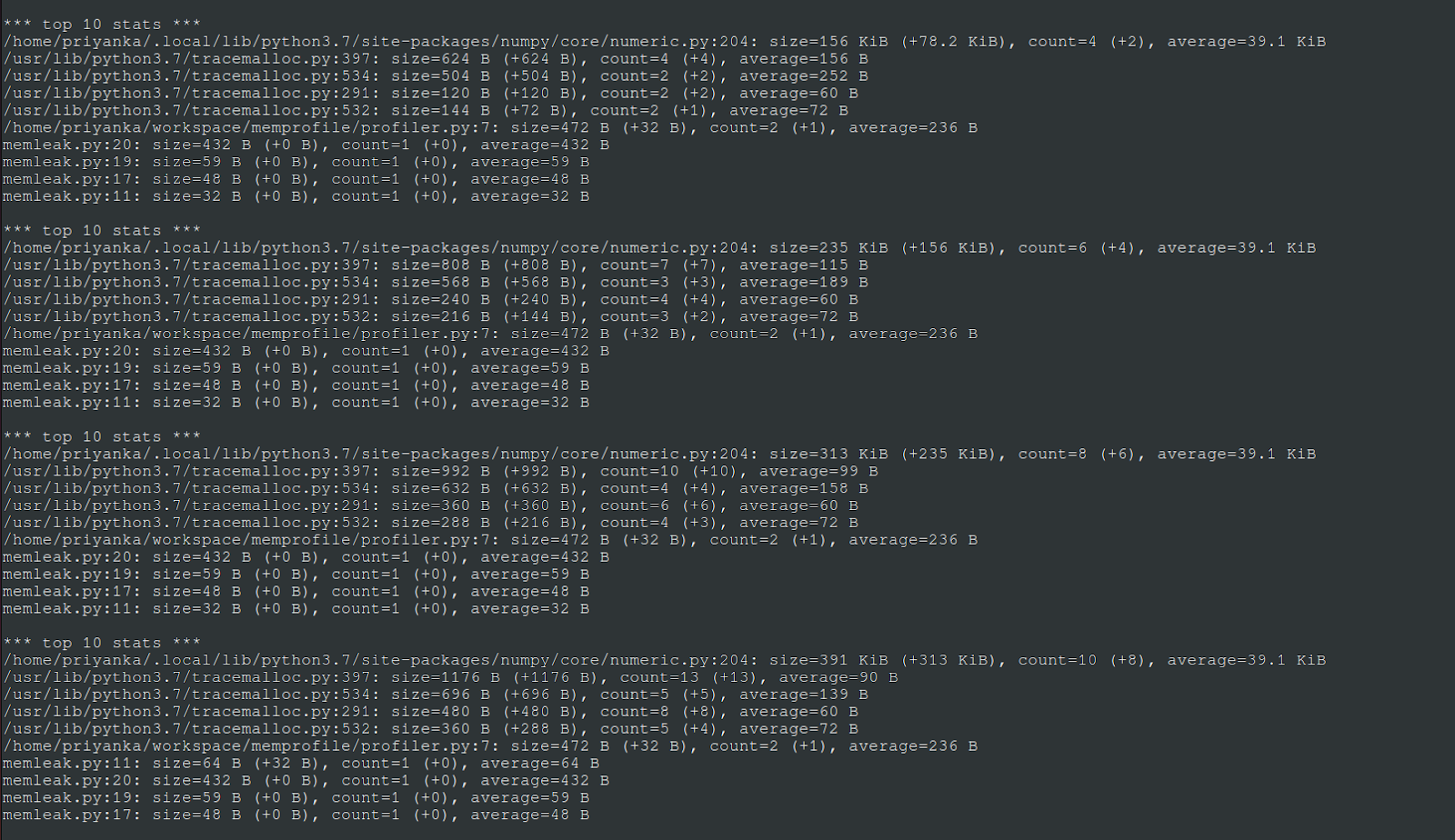
<p>The complete output of <code class="language-plaintext highlighter-rouge">compare()</code> looks like this.</p>

<p><img src="https://pnawalramka.github.io/docs/assets/python-tracemalloc/output2.png" alt="output2" /></p>

<p>Since there were five total snapshots, there are four sets of statistics from the comparisons. Some important observations here:</p>

<ul>
  <li>numpy/core/numeric.py at line 204, is at the top in each set, allocating the most memory.</li>
  <li>Now, note the change in memory usage by numeric.py as I go over each of the result sets.
    <ul>
      <li>In the first set, the total memory used by numeric.py is 156 Kb, an increase of 78 Kb from the first snapshot.</li>
      <li>In the second set, total memory used by numeric.py jumps to 235 Kb, a total increase of 156 Kb from the first snapshot. Doing a little math, this also means there was an increase of ~79 Kb since the last snapshot.</li>
      <li>In the third set, total memory used by numeric.py jumps to 313 Kb, a total increase of 235 Kb from the first snapshot. This also means there was again an increase of ~78 Kb since the last snapshot.</li>
      <li>In the fourth set, total memory used by numeric.py jumps to 391 Kb, a total increase of 313 Kb from the first snapshot. This also means there was, once again, an increase of ~78 Kb since the last snapshot.</li>
    </ul>
  </li>
</ul>

<p>A clear cumulative trend can be seen here in the allocation done by <code class="language-plaintext highlighter-rouge">numeric.py</code>. At each iteration, ignoring rounding differences, ~78 Kb more memory was allocated. If you look at <code class="language-plaintext highlighter-rouge">mem_leaker()</code> again, it appends ten thousand elements to the array, each of size 8 bytes, which brings the total to 80000 bytes, or 78.125 Kb. This matches the observed increase from the snapshot deltas.</p>

<p>It is constantly growing trends like this that eventually lead to a code problem if the growth pattern is unexpected.</p>

<h3 id="see-a-traceback">See a traceback</h3>

<p>The last thing in the example was to print the traceback for the largest memory block for more granularity. In this case, the largest block is one from numeric.py. The filter_traces() method is very helpful in eliminating noise when debugging long traces.</p>

<div class="language-python highlighter-rouge"><div class="highlight"><pre class="highlight"><code><span class="k">def</span> <span class="nf">print_trace</span><span class="p">():</span>
	<span class="c1"># pick the last saved snapshot, filter noise
</span>	<span class="n">snapshot</span> <span class="o">=</span> <span class="n">snaps</span><span class="p">[</span><span class="o">-</span><span class="mi">1</span><span class="p">].</span><span class="n">filter_traces</span><span class="p">((</span>
    	    <span class="n">tracemalloc</span><span class="p">.</span><span class="n">Filter</span><span class="p">(</span><span class="bp">False</span><span class="p">,</span> <span class="s">"&lt;frozen importlib._bootstrap&gt;"</span><span class="p">),</span>
    	    <span class="n">tracemalloc</span><span class="p">.</span><span class="n">Filter</span><span class="p">(</span><span class="bp">False</span><span class="p">,</span> <span class="s">"&lt;frozen importlib._bootstrap_external&gt;"</span><span class="p">),</span>
    	    <span class="n">tracemalloc</span><span class="p">.</span><span class="n">Filter</span><span class="p">(</span><span class="bp">False</span><span class="p">,</span> <span class="s">"&lt;unknown&gt;"</span><span class="p">),</span>
	<span class="p">))</span>
	<span class="n">largest</span> <span class="o">=</span> <span class="n">snapshot</span><span class="p">.</span><span class="n">statistics</span><span class="p">(</span><span class="s">"traceback"</span><span class="p">)[</span><span class="mi">0</span><span class="p">]</span>

	<span class="k">print</span><span class="p">(</span><span class="sa">f</span><span class="s">"</span><span class="se">\n</span><span class="s">*** Trace for largest memory block - (</span><span class="si">{</span><span class="n">largest</span><span class="p">.</span><span class="n">count</span><span class="si">}</span><span class="s"> blocks, </span><span class="si">{</span><span class="n">largest</span><span class="p">.</span><span class="n">size</span><span class="o">/</span><span class="mi">1024</span><span class="si">}</span><span class="s"> Kb) ***"</span><span class="p">)</span>
	<span class="k">for</span> <span class="n">l</span> <span class="ow">in</span> <span class="n">largest</span><span class="p">.</span><span class="n">traceback</span><span class="p">.</span><span class="nb">format</span><span class="p">():</span>
    	    <span class="k">print</span><span class="p">(</span><span class="n">l</span><span class="p">)</span>
</code></pre></div></div>

<p>The trace looks like this.</p>

<p><img src="https://pnawalramka.github.io/docs/assets/python-tracemalloc/output3.png" alt="output3" /></p>

<p>This trace leads from the application code to the line in the numpy library, where the allocation actually takes place. You can look at the source code <a href="https://github.com/numpy/numpy/blob/main/numpy/core/numeric.py#L204">here</a>.</p>

<h3 id="conclusion">Conclusion</h3>
<p>Here, you saw a simple demonstration of using Python stdlib’s tracemalloc module to observe various memory related statistics, compared snapshots to see the allocation deltas and used all this information to trace back to the code using a substantial amount of memory. In large applications, it may take some time to narrow down scope and find the line of code introducing a leak. The tracemalloc module provides all the necessary APIs to do so, and it just works out of the box.</p>

<h3 id="references">References</h3>
<p>https://docs.python.org/3/library/tracemalloc.html</p>

<p><em>This article was initially published <a href="https://www.red-gate.com/simple-talk/development/python/memory-profiling-in-python-with-tracemalloc/">here</a>.</em></p>]]></content><author><name>Priyanka Nawalramka</name><email>priyanka.nawalramka@gmail.com</email></author><summary type="html"><![CDATA[Memory Profiling in Python with tracemalloc]]></summary></entry><entry><title type="html">Batch Processing in Go</title><link href="/2020/11/25/go-batching.html" rel="alternate" type="text/html" title="Batch Processing in Go" /><published>2020-11-25T00:00:00+00:00</published><updated>2020-11-25T00:00:00+00:00</updated><id>/2020/11/25/go-batching</id><content type="html" xml:base="/2020/11/25/go-batching.html"><![CDATA[<h1 id="batch-processing-in-go">Batch Processing in Go</h1>

<p>Batching is a common scenario developers come across. Basically, to split a large amount of work into smaller chunks for optimal processing.</p>

<p>Seems pretty simple, and it really is. Say, we have a long list of items we want to process in some way. A pre-defined number of them can be processed concurrently. I can see two different ways to do it in Go.</p>

<p>First, using plain old slices. This is something most developers have probably done at some point in their career.
Let’s take this simple example:</p>

<div class="language-plaintext highlighter-rouge"><div class="highlight"><pre class="highlight"><code>func main() {
	data := make([]int, 0, 100)
	for n := 0; n &lt; 100; n++ {
		data = append(data, n)
	}
	process(data)
}

func processBatch(list []int) {
	var wg sync.WaitGroup
	for _, i := range list {
		x := i
		wg.Add(1)
		go func() {
			defer wg.Done()
			// do more complex things here
			fmt.Println(x)
		}()
	}
	wg.Wait()
}

const batchSize = 10

func process(data []int) {
	for start, end := 0, 0; start &lt;= len(data)-1; start = end {
		end = start + batchSize
		if end &gt; len(data) {
			end = len(data)
		}
		batch := data[start:end]
		processBatch(batch)
	}
	fmt.Println("done processing all data")
}
</code></pre></div></div>

<p>The data to process is a plain list of integers. To keep things simple, we just want to print all of them, at most 10 concurrently. To achieve this, we loop over the list, divide it into chunks of <code class="language-plaintext highlighter-rouge">batchSize = 10</code> and process each batch serially. Short and sweet, and does what we want.</p>

<p>The second approach uses a buffered channel, similar to what’s described <a href="https://medium.com/@deckarep/gos-extended-concurrency-semaphores-part-1-5eeabfa351ce">in this post on concurrency</a>. Let’s look at the code first.</p>

<div class="language-plaintext highlighter-rouge"><div class="highlight"><pre class="highlight"><code>func main() {
	data := make([]int, 0, 100)
	for n := 0; n &lt; 100; n++ {
		data = append(data, n)
	}
	batch(data)
}

const batchSize = 10

func batch(data []int) {
	ch := make(chan struct{}, batchSize)
	var wg sync.WaitGroup
	for _, i := range data {
		wg.Add(1)
		ch &lt;- struct{}{}
		x := i
		go func() {
			defer wg.Done()
			// do more complex things here
			fmt.Println(x)
			&lt;-ch
		}()
	}
	wg.Wait()
	fmt.Println("done processing all data")
}
</code></pre></div></div>

<p>This example uses a buffered channel of size 10. As each item is ready to be processed, it tries to <em>send</em> to the channel. Sends are blocked after 10 items. Once processed, it <em>reads</em> from the channel, thereby releasing from the buffer. Using a <code class="language-plaintext highlighter-rouge">struct{}{}</code> saves us some space, because whatever is sent to the channel never gets used.</p>

<p>As the author of <a href="https://medium.com/@deckarep/gos-extended-concurrency-semaphores-part-1-5eeabfa351ce">the post</a> points out, here we’re exploiting the properties of a buffered channel to limit concurrency. One might argue, this is not really batching, rather it’s concurrent processing with a threshold. And I would totally agree. Regardless, it gets the job done and the code is tad simpler.</p>

<p>Is it any better than slices? Probably not. As for speed, I timed the execution of both programs, they ran pretty close. These examples are far too simple to see any significant difference in runtime. Channels in general are slower and more expensive than slices. Since there is no meaningful data being passed between the goroutines, it’s probably a wasted effort. So why would I do it this way? Well, I like simple code. But that might not be enough of a reason. If the cost of serial processing of each batch outweighs the cost of using a channel, it might be worth a consideration!</p>

<p><em>Note: Code snippets on this post are available <a href="https://github.com/pnawalramka/pnawalramka.github.io-code-examples">here</a>.</em></p>

<p>This content is also available <a href="https://dzone.com/articles/batch-processing-in-go">here</a>.</p>]]></content><author><name>Priyanka Nawalramka</name><email>priyanka.nawalramka@gmail.com</email></author><summary type="html"><![CDATA[Batch Processing in Go]]></summary></entry></feed>